For small field-service crews

Run the day,
not the chaos.

Tasks, scheduling, photos, and crew chat — all in one app, built for the way you actually work in the field.

Free for up to 3 crew No credit card Cancel anytime
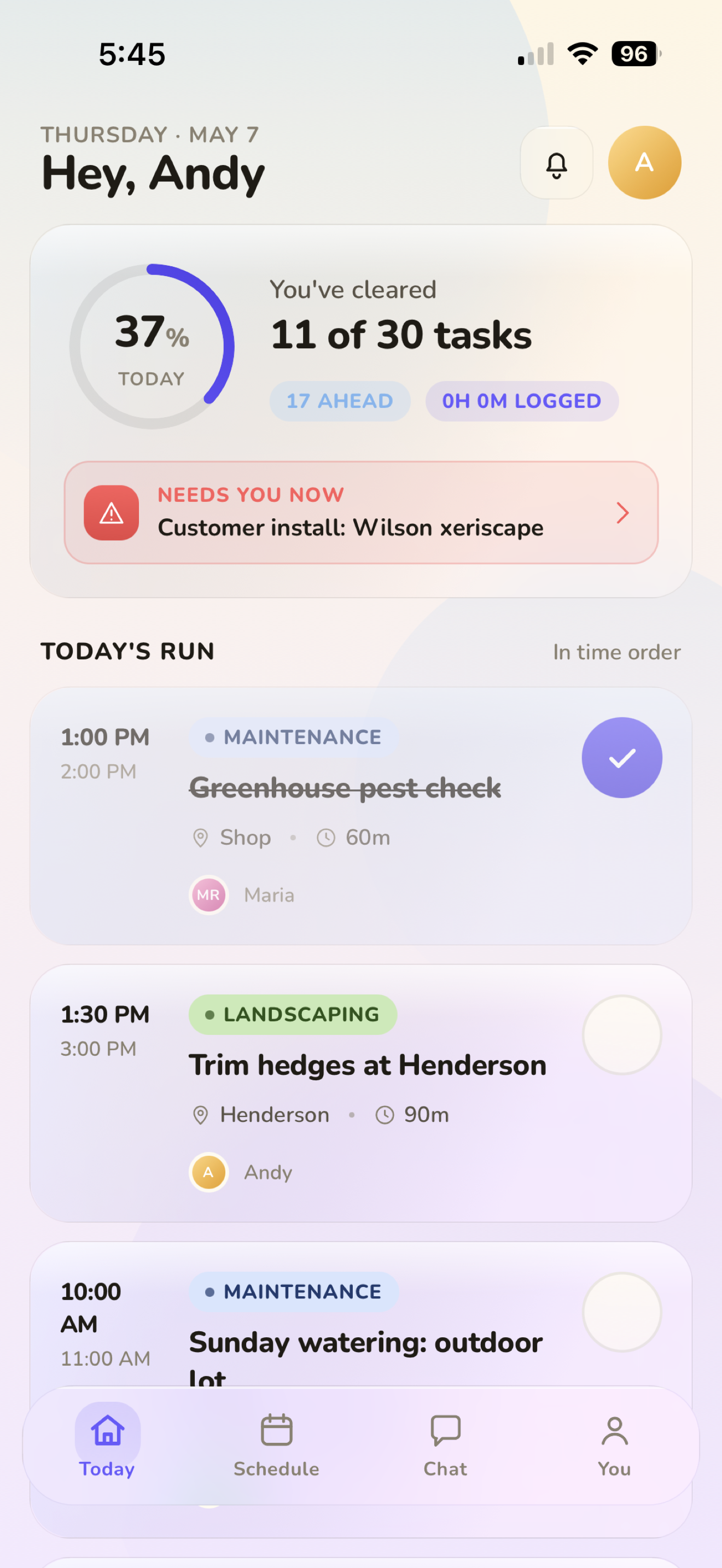
TeamTask crew home screen showing today's tasks
Henderson Lawn — done
Photo proof attached · 9:04 AM
Today's crew
Tony · Mike · 1 site
Built for your trade

Whatever your crew does, TeamTask was built for it.

And anything else 2–50 people in the field do — electrical, handyman, pool service, pest control, painting. Free for up to 3 crew on every plan.

Sound familiar?

Still texting your crew
where to be?

There's a better way. Tasks, photos, schedules, and chat — all in one app, built for the way you actually work.

Everything you need
One app. Zero group texts.

Built specifically for field crews — not generic project managers, not enterprise software. Just what you need.

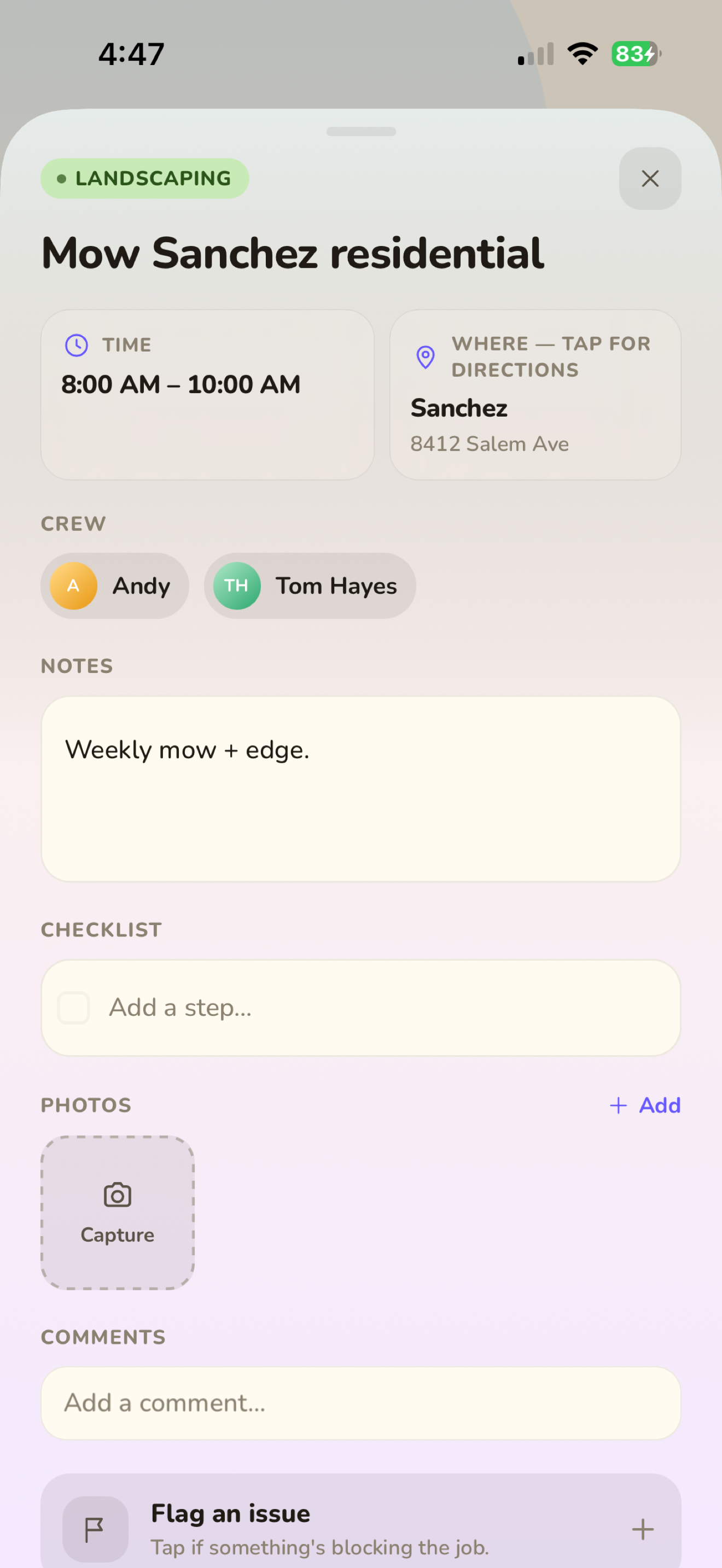
Tasks & subtasks

Assign jobs, attach photos, require completion notes. Every crew member sees exactly what's next — no hunting through texts.

Photo proof Completion notes Issue flags GPS directions
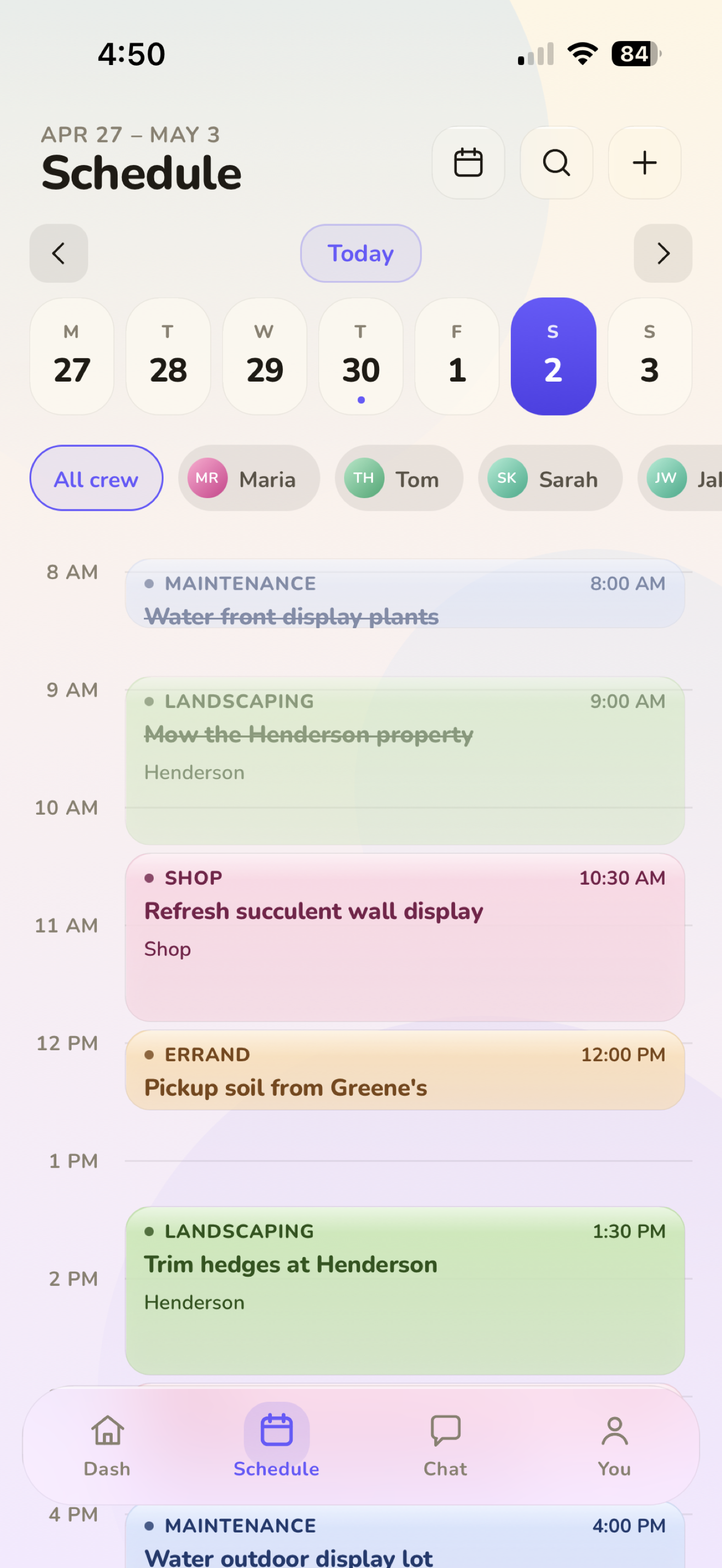
Task calendar

The whole week, color-coded by job type. Recurring jobs auto-generate — set them once, they keep coming.

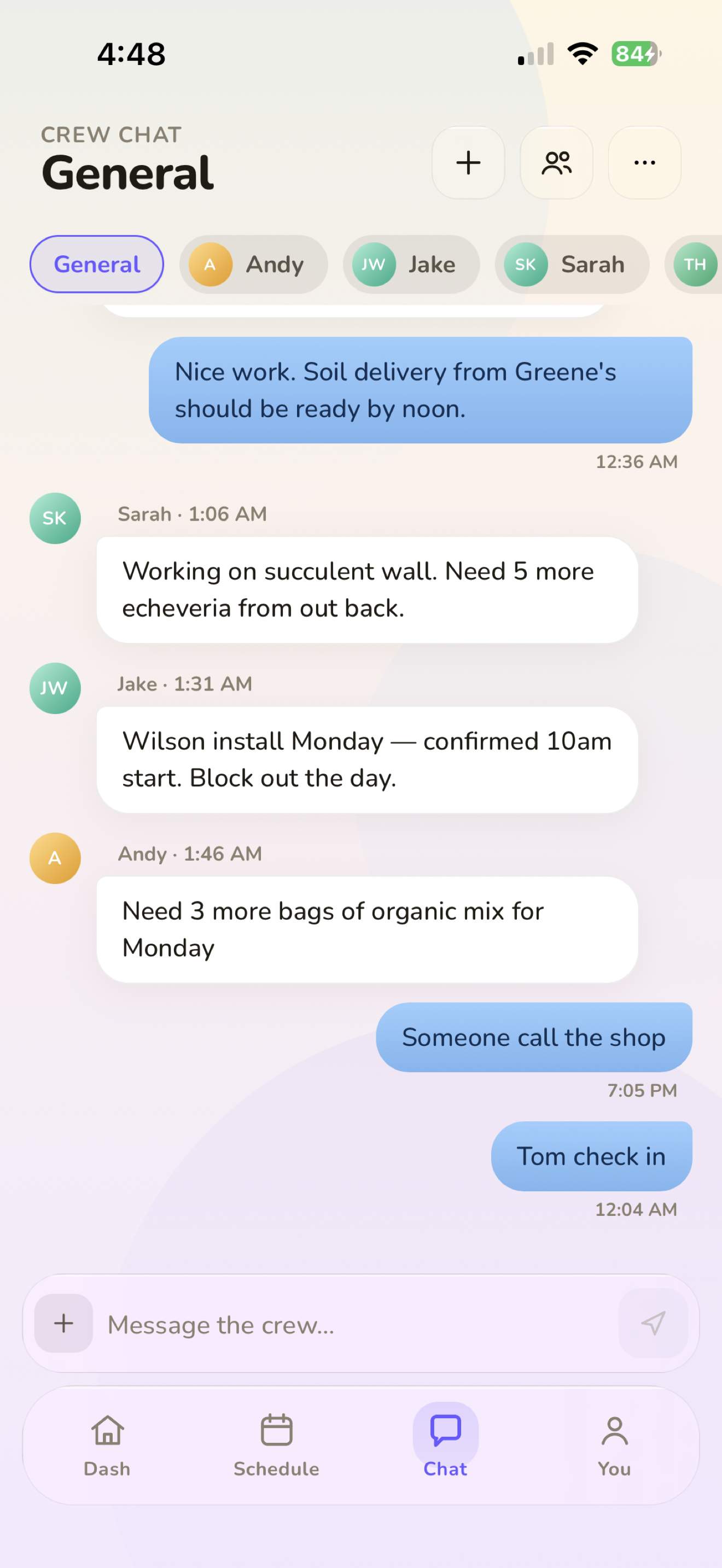
Crew chat

Channels, DMs, @mentions, pinned updates. Nothing lost in iMessage.

Heading to Henderson now 🚛
Front lawn done ✓
Time tracking

Clock in, clock out, export timesheets to CSV. Optional GPS check-in for jobsite verification when you need it — not forced on everyone.

Task detail with photos, checklist, and clock-in
Tasks that hold their weight

One tap from "to-do" to "done — with proof."

Every job carries time, location, crew, photos, notes, subtasks, and a clock-in/out trail. When something's blocking the work, flag it and the manager hears about it instantly.

  • Photo proof + completion notes when you need them
  • Tap-for-directions on every site address
  • Issue flags routed straight to the manager
Week-view schedule with color-coded jobs
Schedule the week, not the firefight

The whole crew's day, color-coded.

Drag a job to a new time. Spot conflicts before they happen. See every site, every assignee, every overdue — in a single glance without opening a spreadsheet.

  • Per-crew filters and time-block view
  • Recurring jobs auto-generate 30 days out
  • Push reminders before each job starts
Crew chat with messages and photos
Communication that doesn't escape into texts

Every update, in the place you'll actually find it.

Group channels. DMs. @mentions that ping. Pinned messages. Photos. All searchable, all in the org — none of it scattered across iMessage threads.

  • Pin announcements to the top of any channel
  • Mute, block, and report tools built in
  • Read receipts on direct messages
Simple pricing

Free for small crews. Scale when you're ready.

No contracts. No onboarding fees. Cancel anytime.

Free
$0
forever
  • Up to 3 team members
  • Tasks & scheduling
  • Team chat
  • Photo attachments
Get started free
Growth
$49.99
per month
  • Large teams (50+)
  • Everything in Starter
  • GPS check-in
  • Advanced analytics
Get Growth
How we compare

Simpler than Monday.com. More focused than Jobber. Built for your crew.

Monday.com and Asana are built for office teams. Jobber is built for invoicing. TeamTask is built for the guy who needs his crew to know where to be and prove it's done.

Feature TeamTask Jobber Monday.com Asana Connecteam
Free plan Up to 3 crew Limited Limited
Starting price $19.99/mo $49/mo $9/user/mo $10.99/user/mo $29/mo
Task assignment
Photo proof of completion Add-on
Built for field trades crews Partial Office teams Office teams Generic
Crew chat Limited
Jobsite address per task Manual
Setup time Minutes Hours–days Days–weeks Days–weeks Hours
Mobile-first (iOS) App available App available App available App available
Common questions

Everything you need to know

Is TeamTask a good Jobber alternative?

Yes — especially for small crews who don't need Jobber's invoicing, CRM, or quoting features. Jobber starts at $49/month and is built for businesses managing customer relationships. TeamTask starts free and focuses on what your field crew actually needs every day: tasks, schedules, addresses, and photo proof. If you're paying for Jobber but only using the scheduling tab, TeamTask is a better fit and a fraction of the cost. See the full TeamTask vs Jobber breakdown →

How does TeamTask compare to Housecall Pro?

Housecall Pro is strong on customer-facing features — automated follow-up texts, review requests, and online booking. TeamTask is focused on internal crew coordination. If your problem is "my customers don't know their job status," use Housecall Pro. If your problem is "my crew doesn't know where they're going," use TeamTask. Most small trades shops need the latter, not the former. See TeamTask vs Housecall Pro →

Is TeamTask free?

Yes. TeamTask is free for up to 3 team members with full access to tasks, scheduling, photo proof, and crew chat. No credit card required. Paid plans start at $19.99/month for up to 10 members, and $49.99/month for larger crews.

What trades is TeamTask built for?

TeamTask is built for any field service crew with 2–50 people: landscaping, lawn care, cleaning services, HVAC, plumbing, electrical, general contracting, handyman, pest control, pool service, painting, and similar trades. If your guys are in the field and you're coordinating their days, TeamTask works for you.

Does TeamTask replace Connecteam?

For trades and field service crews, yes. Connecteam is a horizontal tool built for shift-based businesses like restaurants and retail. TeamTask is built specifically for field crews — it includes job-site addresses, task-specific photo proof, and crew chat in a workflow designed for the way trades crews actually work. Connecteam requires significant setup to approximate what TeamTask does out of the box. See TeamTask vs Connecteam →

Is TeamTask available on iPhone?

Yes. TeamTask is available on the App Store for iPhone. Your whole crew downloads it, you assign tasks from your phone, and they see their day the moment they wake up. Android is on the roadmap.

How long does setup take?

Most crews are up and running in under 10 minutes. Download the app, create your team, add your first task, and share the invite link with your crew. No onboarding calls, no demo required, no configuration menus to navigate.

Is TeamTask a better option than Monday.com for a field crew?

Yes — significantly. Monday.com is built for office-based project management: marketing campaigns, software sprints, product roadmaps. It has no concept of a jobsite address, photo proof of field work, or crew scheduling by site location. TeamTask is built ground-up for field service crews who need their guys to know where to be, what to do, and how to prove it's done. Monday.com starts at $9/user/month and requires days of setup. TeamTask is free for up to 3 crew and takes 10 minutes. See TeamTask vs Monday.com →

Can TeamTask replace Asana for a small service business?

For field crew coordination, yes. Asana is strong for knowledge workers tracking project deliverables — it's not designed for people in the field. It has no jobsite addresses, no photo capture, no field-worker-first mobile interface. If you've been using Asana to manage your crew's daily jobs and it feels clunky, it's because it is — it wasn't built for this. TeamTask was. See TeamTask vs Asana →

How is TeamTask different from ClickUp or Trello?

ClickUp and Trello are horizontal productivity tools built for desk-based teams. They require significant configuration to approximate even basic field crew workflows. TeamTask works out of the box for trades businesses — no custom fields, no template setup, no Zapier integrations required. Open the app, add your crew, assign a job. That's it.

Ready to run a tighter crew?

Free for up to 3 crew. Scale up when you're ready. On the App Store now.

Download on the App Store →
Free for up to 3 crew No credit card required Cancel anytime